Posts

Showing posts with the label php

Pass Values from PHP to Javascript

Image
There are many ways to pass PHP variables to Javascript but I will only cover 3 most common: 1. Echo the data. 2. Use a hidden field or element. 3. Use a data attribute 1. Echo the data. The first one which is the simplest can be done as follows: var data = <?php echo $data;  ?>; But the above code can cause an issue depending on the data type and it's value, so we use json_encode to convert the data. In PHP: $name = "John O'Reily";     // a string with single quote $age = 14;                           // an integer number $address = array(                // an array     'street' => '123 Street',     'city' => 'XYZ City' ); In Javascript: var name = <?php echo json_encode($name);  ?>; var age = parseInt(<?php echo json_encode($age);  ?>); var address = <?php echo json_encode($address);  ?...

PHPUnit: Basics of Unit Testing

Image
What is Unit Testing ? Unit Testing is a software testing method by which individual units of code are tested to determine if they are fit to use. Benefits of Unit Testing - find problems early - facilitates changes - simplifies integration - documentation - design interface What is PHPUnit? - xUnit-style library by Sebastian Bergmann - Installable via Composer, PEAR and Phar - well integrated and well documented reference: http://phpunit.de/manual/current/en/index.html Installation (globally via Phar) wget https://phar.phpunit.de/phpunit.phar chmod +x phpunit.phar mv phpunit.phar /usr/bin/phpunit source: http://phpunit.de/manual/current/en/installation.html Installation (as vendor via Composer) Create a composer.json file in the root directory then add the ff.: { "require-dev" : { "phpunit/phpunit" : "4.8.0" }, "autoload" : { "psr-4" : { "Project\\" : "app...

Install Symfony on Vagrant Environment

Image
Vagrant is a tool for building and managing virtual machine environments. Assuming you have already installed and  vagrant up your virtual environment. Execute the following instructions on your terminal console. Download symfony installer sudo curl -LsS https://symfony.com/installer -o /usr/local/bin/symfony sudo chmod a+x /usr/local/bin/symfony Create project directory symfony new my_project Then, you can: * Change your current directory to /vagrant/my_project * Configure your application in app/config/parameters.yml file. * Run your application: 1. Execute the php bin/console server:run command. 2. Browse to the http://localhost:8000 URL. * Read the documentation at http://symfony.com/doc Running #1, should produce result similar to this: php bin/console server:run [OK] Server running on http://127.0.0.1:8000 // Quit the server with CONTROL-C. If you have private network map set in Vagrantfile then do not use server:run as it only listens to http...

Enable OPCache on Ubuntu: Alternative to APC Cache

If you are using PHP 5.5, it is not supported by APC Cache. For reference, see PHP Bug #65731 PHP 5.5 comes with it's own opcode cache which can be enabled with the following steps: 1. Enable opcache in php.ini sudo nano /etc/php5/apache2/php.ini Look for the line: ;opcache.enable=0 And replace with: opcache.enable=1 2. Enable the php mod sudo php5enmod opcache sudo service apache2 restart If you are using PHP lower than 5.5, then you can still use APC. Just run this line in the terminal to install APC. sudo apt-get install php-apc

Install APC for PHP 5.5x in WampServer

Download APCu for PHP 5.5x http://pecl.php.net/package/APCu/4.0.6/windows Extract and copy php_apcu.dll to PHP extension directory C:\wamp\bin\php\php5.5.12\ext Enable APC extension in php.ini extension=php_apcu.dll Restart Wampserver

PHP Pagination with Bootstrap 3

Image
In this guide, I will show you how to create a very simple pagination in PHP using Bootstrap 3. With just a few steps you will be able to create something like this: Before we start, prepare the following files and folders: - bootstrap/ - index.php - pagination.php Step 1: Download Bootstrap 3 and extract its content inside bootstrap directory: - bootstrap/ ├── css/ │ ├── bootstrap.css │ ├── bootstrap.min.css │ ├── bootstrap-theme.css │ └── bootstrap-theme.min.css ├── js/ │ ├── bootstrap.js │ └── bootstrap.min.js ├── fonts/ │ ├── glyphicons-halflings-regular.eot │ ├── glyphicons-halflings-regular.svg │ ├── glyphicons-halflings-regular.ttf │ └── glyphicons-halflings-regular.woff - index.php - pagination.php Step 2: Copy the basic template and paste it in index.php . Step 3: Remove the line: <h1>Hello, world!</h1> And replace with: <div class="container"> <div class="row"> <?php requi...

Adjust phpMyAdmin Session Timeout

There are 2 ways to adjust the session timeout or expiration: PHPMyAdmin Web Interface 1. Go to Settings → Features 2. Adjust value of Login cookie validity PHPMyAdmin configuration file 1. Locate config.inc.php in /path/to/phpmyadmin/ 2. Adjust the value of this line: $cfg['LoginCookieValidity'] = 3600; /* set the expiration time to 1 hour */ or add $cfg['Servers'][$i]['LoginCookieValidity'] = 3600; Please note that session.gc_maxlifetime might limit session validity and if the session is lost, the login cookie is also invalidated. So it is a good idea to set session.gc_maxlifetime in php.ini

CodeIgniter: Add Session in Twig

To add the session variable on your twig template, you have to add the following line in your Twig library or controller. $this->_twig->addGlobal("session", $this->CI->session); Then on your twig template, you can print the session like this {{ session.userdata.username }} Since in CodeIgniter, the session stored by user is usually in the userdata array. Otherwise, you can just simply call the session variable and name {{ session.username }}

Install Anomareh PHP-Twig.tmbundle on Sublime Text 3

So this bundle for Sublime Text is made by Anomareh Basically, what it does is integrate Twig to the said IDE by providing syntax highlighting and auto-completion for Twig when using Sublime. So here's how to install the package. Download the package at https://github.com/Anomareh/PHP-Twig.tmbundle Unzip then copy all the files and folders In Sublime, click Browse Packages under the Preferences menu Create a directory named Twig on Packages folder Paste the files that you copied earlier into the Twig folder Restart Sublime Now, in your twig file, click on the bottom right of the sublime window (a drop up/down should appear) Select HTML (Twig) from the list of languages to enable the package. This should work on Sublime Text 2 as well.

Adding template engine Twig on CodeIgniter

Image
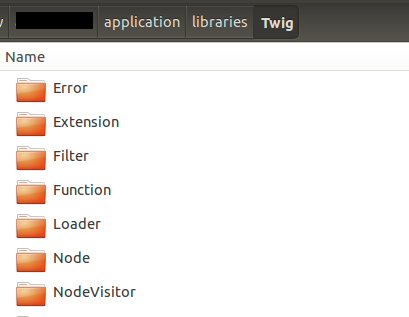
1. Download Twig vendor from http://twig.sensiolabs.org/ 2. Extract the files and copy the contents of the Twig-1.x.x\lib to /application/libraries/ Your library should have the Twig folder inside /libraries/Twig 3. Create a Twig.php inside the libraries folder then add the following code: class Twig { private $CI; private $_twig; private $_template_dir; private $_cache_dir; public function __construct($debug = false) { $this->CI =& get_instance(); self::requireTwigAutoloader(); Twig_Autoloader::register(); $this->CI->config->load('twig'); $this->_template_dir = $this->CI->config->item('template_dir'); $this->_cache_dir = $this->CI->config->item('cache_dir'); $loader = new Twig_Loader_Filesystem($this->_template_dir); $this->_twig = new Twig_Environment($loader, array( 'cache' => $this-...

Propel: Creating Custom Query

Propel's Query class allows us to construct query without writing the actual sql. It's good for common queries but if we have to build complex queries, it may prove more less effective. Knowing how to create custom queries also gives you a way to select data from view tables. I don't know why propel does not generate models for view tables, probably because they are view tables and does not really do anything except to select data. Anyway, I decided to write about creating your custom queries so to help you on that. Let's say I have a table called 'books' with the following fields id title isbn To create a custom query, do it like this: $sql = "SELECT * FROM books"; $con = Propel::getConnection(); $stmt = $con->prepare($sql); $stmt->execute(); $result = $stmt->fetchAll(PDO::FETCH_ASSOC); Now i can select the query like this: foreach($results as $row) { echo $row['id']; echo $row['title']; echo $row['...

Installing Propel in CodeIgniter

INSTALLING PROPEL IN CODEIGNITER Download CodeIgniter http://ellislab.com/codeigniter Download Propel ORM http://propelorm.org/download.html Inside CodeIgniter application directory, create the following directories: build build/data Note: Anywhere is fine, this is just for organization Unzip Propel ORM, copy the generator directory and rename to propel in application/build/data Copy build.properties-sample from build/data/propel to build/data without the ‘-sample’ Add the following data to build.properties with your own variables propel.project = ci propel.database = mysql propel.database.url = mysql:host=localhost;dbname=demo propel.database.user = root propel.database.password = password Then at the last part of the same file add: propel.project.dir = ${propel.home} propel.output.dir = ${propel.project.dir}/output propel.conf.dir = ${propel.project.dir} propel.sql.dir = ${propel.output.dir}/sql propel.graph.dir = ${propel.output.dir}/graphs propel.omtar.d...

CodeIgniter - Extending Form Validation

Overview 1. Store all form validation in application/config/form_validation.php 2. Create a library to extend form validation for callback functions 3. Run the form validation inside the controller method Step 1: Create form_validation.php Create the file application/config/form_validation.php then add your form validations In my example, I’ll do something like the code below which validates the inputs when a user creates a news article $config = array( 'article' => array( array( 'field' => 'news_title', 'label' => 'Title', 'rules' => 'trim|required|max_length[100]' ), array( 'field' => 'news_body', 'label' => 'Body', 'rules' => 'trim|required' ), array( 'field' => 'news_category', 'label...

Setup Virtual Hosts in Ubuntu

Open terminal then run the command. cd /etc/apache2/sites-available/ sudo cp default llanalewis.dev sudo nano llanalewis.dev Change llanalewis.dev to your vhost name. In some ubuntu versions, default is 000-default Copy and paste the code below to llanalewis.dev : <VirtualHost *:80> ServerAdmin webmaster@localhost ServerName llanalewis.dev DocumentRoot /home/user/public_html/llanalewis_dev <Directory /home/user/public_html/llanalewis_dev> AllowOverride All allow from all </Directory> </VirtualHost> Save and close the file then open /etc/hosts . Add the line below to the list of your hosts 127.0.0.1 llanalewis.dev Save and close /etc/hosts then on the terminal enable your new vhost by running the command below: sudo a2ensite llanalewis To disable the site, just run: sudo a2dissite llanalewis To apply the changes, restart your apache, type on the terminal: sudo service apache2 restart On your favorite browser, type your new virtual hos...

Installing Symfony 2.0 Framework in Ubuntu

Symfony is PHP MVC framework used to create websites and web application. There are certain things you need to do first because you can run a Symfony website This guide provides a step by step instructions on setting up Symfony in your localhost. 1. Prepare the requirements. Follow the link of the ff softwares and packages to download: Symfony 2.0 with vendors ( preferrably v2.0.17 since this guide was based on that. ) Propel ORM Phing Propel Bundle 2. Extract each packages in its rightful location Symfony -> your web root Propel ORM -> Symfony/vendor Phing -> Symfony/vendor Propel Bundle -> Symfony/vendor/bundles/Propel 3. Register the Propel Bundle in app/AppKernel.php and app/autoload.php # add this code in app/AppKernel.php public function registerBundles() { $bundles = array( // ... new Propel\PropelBundle\PropelBundle(), ); // ... } # add this code in app/autoload.php $loader->registerNamespaces(ar...

Install Pear and Phing on Wamp Server

FOR WAMPSERVER Download http://pear.php.net/go-pear.phar Go to C:\wamp\bin\php\php5.x.x\ Save go-pear.phar to the php directory then run: php -d phar.require_hash=0 go-pear.phar On Pear installation, select local install, enter till the part about modifying php.ini (N) Run pear version to see if installation is successful Next, right-click wamp server tray icon, then click PHP → php.ini Uncomment include_path , set value to: include_path = ".;C:\wamp\php\php5.x.x\pear" Restart wamp server If it does not work, change directory to C:\wamp\bin\php\php5.x.x\ then change php.ini include_path = ".;C:\wamp\php\php5.x.x\pear" Restart wamp server Still inside php directory, run pear channel-discover pear.phing.info pear install phing/phing If installation requires root permission run: runas /user:Administrator cmd where Administrator is the account username of the administrator To run phing and pear from any directory, add the bat file to wind...