Posts

Showing posts with the label javascript

Javascript: Redirect to Another Page

Redirect to Another Page With Javascript // window.location window.location.replace('http://www.example.com') window.location.assign('http://www.example.com') window.location.href = 'http://www.example.com' document.location.href = '/path' // window.history window.history.back() window.history.go(-1) // window.navigate; ONLY for old versions of Internet Explorer window.navigate('top.jsp') Redirect to Another Page With JQuery $(location).attr('href','http://www.example.com') $(window).attr('location','http://www.example.com') $(location).prop('href', 'http://www.example.com')

jQuery: Check Element Visibility

For a single element, it is very easy to check if an element is hidden or visible: $(element).is(":visible"); $(element).is(":hidden"); To match all elements, use the ff: $('element:hidden'); $('element:visible') You can also check the CSS display property: if ( $(selector).css('display') == 'none' ) { // is hidden } else { // is visible }

Javascript: Capitalize First Word of String (EASY)

In Javascript, you can make the first word uppercase by using the technique below. function capitalize(str) { return str.charAt(0).toUpperCase() + str.slice(1); } var str = "lorem ipsum dolor"; capitalize(str); // output: "Lorem ipsum dolor" To explain what's going on, the function takes the first letter of given string and convert it to uppercase then append to the rest of the given string. We can modify the String.prototype if you don't mind a little setback on the performance. String.prototype.capitalize = function() { return this.charAt(0).toUpperCase() + this.slice(1); } Now we can call the function in object oriented way: var str = "lorem ipsum dolor"; console.log(str.capitalize()); // output: "Lorem ipsum dolor"

Javascript: Get Query String (Easy)

Image
This tutorial assumes that you already know what a query string is. If you are looking for a way to get the query string values and assign to a variable, then check the following block of codes. Do note that this is only pure Javascript. No need for plugins or libraries. var queryString = {}; var params = location.search.substr(1).split('&'); params.forEach(function( param ){     [name, value] = param.split('=');     queryString[name] = decodeURIComponent((value).replace(/\+/g, '%20')); }); // check the output console.log(queryString); In the above code, we use location.search which is the way to get the query string. The result of location.search . would be a string type like this: ?key1=value1&key2=value2 To get the desired result we want, we first remove the '?' mark with .substr(1) , then split the string with delimiter '&' The resulting array is then looped through using .forEach() . For each array item we then spli...

jQuery: Select an element by name

Image
Although the title says jQuery  in it, I will also provide Javascript solution for this snippet. Live Demo at CodePen Suppose we have the following checkbox input: <input type="checkbox" name="colors" value="red" /> Red <input type="checkbox" name="colors" value="green" /> Green <input type="checkbox" name="colors" value="blue" /> Blue in jQuery: var colors = $('[name="colors"]'); // non-element specific var colors = $('input[name="colors"]'); // specific to "input" elements only in JavaScript: // returns array of elements with name="colors" var colors = document.getElementsByName('colors'); var colors = document.querySelectorAll('[name="colors"]'); // returns first element with name="colors" var colors = document.getElementsByName('colors')[0]; var colors = documen...

Pass Values from PHP to Javascript

Image
There are many ways to pass PHP variables to Javascript but I will only cover 3 most common: 1. Echo the data. 2. Use a hidden field or element. 3. Use a data attribute 1. Echo the data. The first one which is the simplest can be done as follows: var data = <?php echo $data;  ?>; But the above code can cause an issue depending on the data type and it's value, so we use json_encode to convert the data. In PHP: $name = "John O'Reily";     // a string with single quote $age = 14;                           // an integer number $address = array(                // an array     'street' => '123 Street',     'city' => 'XYZ City' ); In Javascript: var name = <?php echo json_encode($name);  ?>; var age = parseInt(<?php echo json_encode($age);  ?>); var address = <?php echo json_encode($address);  ?...

Javascript: Creating a dynamic Copyright footer

Image
Updating your website's copyright year on annual basis can be annoying, to make your copyright year dynamically change, simply use the new Date.getFullYear(); code as shown in the example below. Live Demo  at CodePen the HTML: &copy; 1997 - <span id="currentYear"></span> // desired ouput: © 1997 - 2017 on pure Javascript: document.getElementById('currentYear').innerHTML = new Date().getFullYear(); or if you use jQuery [ CodePen demo ]: $('#currentYear').html(new Date().getFullYear());

PHP Pagination with Bootstrap 3

Image
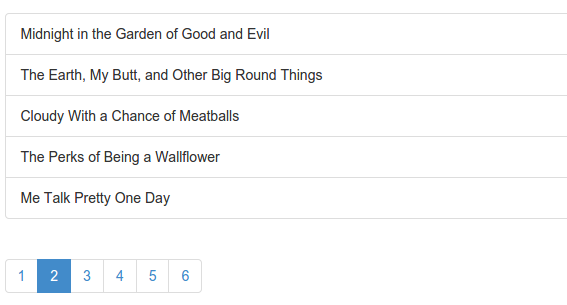
In this guide, I will show you how to create a very simple pagination in PHP using Bootstrap 3. With just a few steps you will be able to create something like this: Before we start, prepare the following files and folders: - bootstrap/ - index.php - pagination.php Step 1: Download Bootstrap 3 and extract its content inside bootstrap directory: - bootstrap/ ├── css/ │ ├── bootstrap.css │ ├── bootstrap.min.css │ ├── bootstrap-theme.css │ └── bootstrap-theme.min.css ├── js/ │ ├── bootstrap.js │ └── bootstrap.min.js ├── fonts/ │ ├── glyphicons-halflings-regular.eot │ ├── glyphicons-halflings-regular.svg │ ├── glyphicons-halflings-regular.ttf │ └── glyphicons-halflings-regular.woff - index.php - pagination.php Step 2: Copy the basic template and paste it in index.php . Step 3: Remove the line: <h1>Hello, world!</h1> And replace with: <div class="container"> <div class="row"> <?php requi...

Show/Hide or Toggle Content with Javascript

Here is a simple javascript snippet that you can use to toggle the contents of a div. function toggleDisplay() {     var e = document.getElementById('toggle_div');     e.style.display = (e.style.display == 'none') ? 'block' : 'none';  } <input type="button" value="Toggle Display" onclick="toggleDisplay()" /> <div id="toggle_div" style="display: none"> Hello World. </div>

Load Bootstrap Modal from AJAX using jQuery

index.html <!-- putting the link in data-href instead of href removes the js error "Uncaught Error: Syntax error, unrecognized expression: /path/to/file --> <a class="btn btn-primary" data-href="modal_content.html" data-toggle="modal" href="#">Show Modal</a> modal_content.html <div class="modal-dialog"> <div class="modal-content"> <div class="modal-header"> <h4 class="modal-title">Modal Title</h4> </div> <div class="modal-body"> Modal Body </div> <div class="modal-footer"> <button class="btn btn-default" data-dismiss="modal" type="button"> Close </button> <button class="btn btn-primary" type="button"> Save Ch...